What is using the most space?
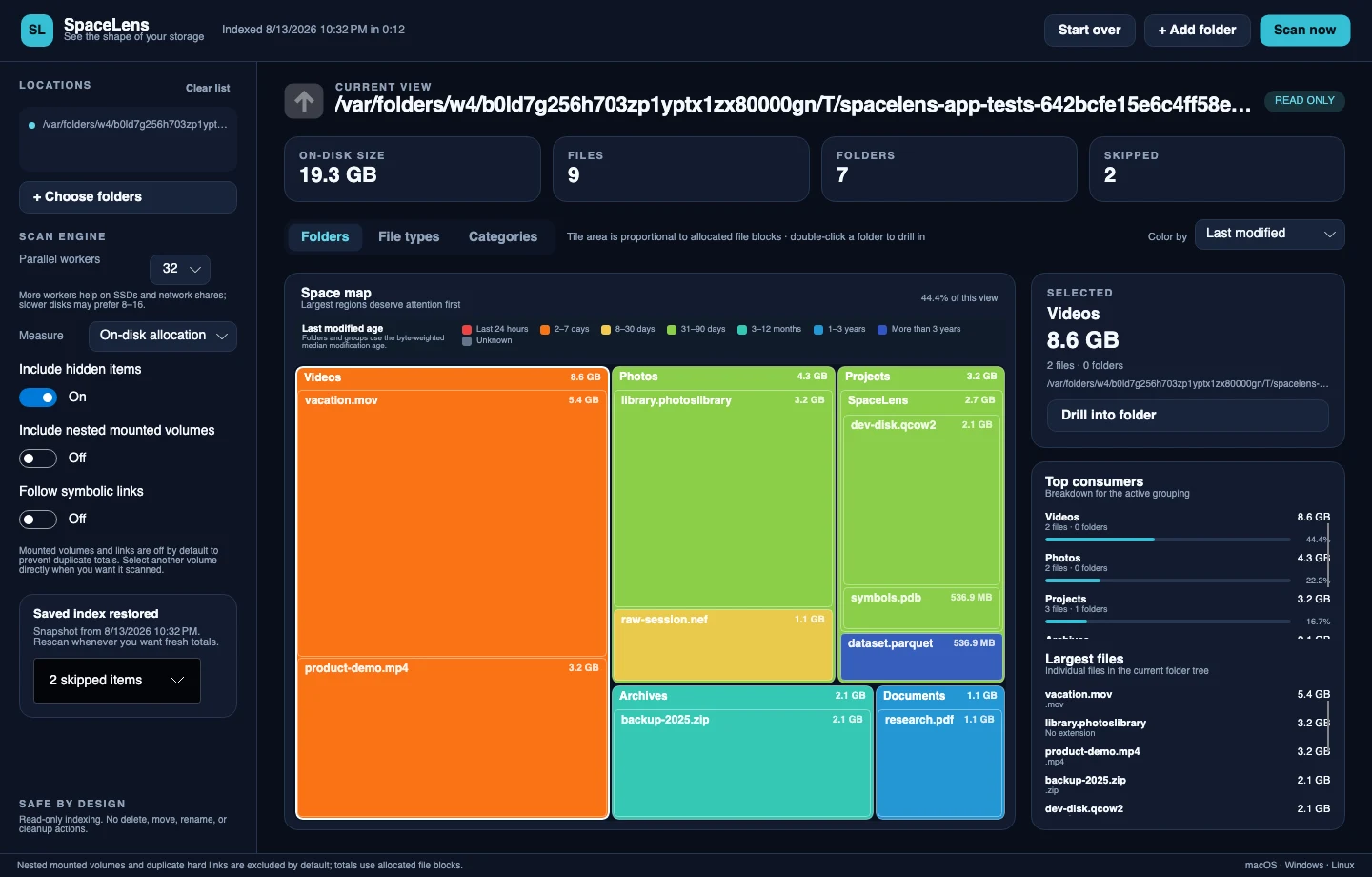
A nested treemap and ranked lists surface the folders, file types, categories, and individual files that dominate the current view.
 SpaceLensSee the shape of your storage
A clearer view of your disk
SpaceLens turns folders and drives into an interactive map, so the largest files and patterns become obvious without a cleanup tool touching your data.
Answers before actions
A nested treemap and ranked lists surface the folders, file types, categories, and individual files that dominate the current view.
SpaceLens separates indexed bytes from filesystem usage and discloses mounts, permissions, hard links, exclusions, and measurement fallbacks.
No. SpaceLens has no delete, move, rename, archive, or cleanup command. It only indexes and explains what it can read.
One index, many perspectives
Every view derives from the same saved index, so changing perspective never starts a hidden rescan or changes the underlying total.
Drill through a space-proportional map without losing the folder structure around each large item.
Switch among folders, extensions, and categories, then color by file type or recency.
Rescan one selected folder while preserving every sibling subtree and the prior usable index on failure.
Compare history, verify duplicate content within a byte budget, and build review-only reclaim proposals.
SpaceLens
Start with the largest region, follow the evidence, and decide for yourself what deserves attention.